ESP8266: Difference between revisions
troubleshooting |
|||
| Line 164: | Line 164: | ||
Source code can be found at: | Source code can be found at: | ||
* https://github.com/espressif/ESP8266_NONOS_SDK | * https://github.com/espressif/ESP8266_NONOS_SDK | ||
== Troubleshooting == | |||
=== Constantly Crashing === | |||
You absolutely need some decoupling capacitors because the initial power-on current draw might be enough to cause the microprocessor to crash. When this happens, you will see a stack printout over and over over the serial console similar to: | |||
{{highlight|lang=text|code= | |||
ets Jan 8 2013,rst cause:2, boot mode:(3,0) | |||
load 0x4010f000, len 1384, room 16 | |||
tail 8 | |||
chksum 0x2d | |||
csum 0x2d | |||
v8b899c12 | |||
~ld | |||
Soft WDT reset | |||
>>>stack>>> | |||
ctx: cont | |||
sp: 3ffffc20 end: 3fffffc0 offset: 01b0 | |||
3ffffdd0: 00000000 4000420c 60000200 3ffef00c | |||
3ffffde0: 00000100 40004ac0 00000100 003fe000 | |||
3ffffdf0: 00000100 3ffeefcc 3fffc718 003fe000 | |||
3ffffe00: 0000049c 00e8a101 40105584 0000049c | |||
3ffffe10: 3ffeefcc 0000049c 003fe000 0000049c | |||
3ffffe20: 3fffc718 3ffeefcc 000003fe 401001f0 | |||
3ffffe30: 003fe000 4022e2e6 000003fe 4023a800 | |||
3ffffe40: 3ffef46c 4022e39f 3ffeefcc 0000049c | |||
3ffffe50: 000003fd 3fffff20 3ffeefcc 4022e382 | |||
3ffffe60: ffffff01 55aa55aa 00000003 00000020 | |||
3ffffe70: 00000020 000000c2 000000c2 aa55aa55 | |||
3ffffe80: 000003ff 4022e86c 3ffeefcc 3ffeefcc | |||
3ffffe90: 00000001 feefeffe feefeffe feefeffe | |||
3ffffea0: 40105789 00000001 3ffeefdc 4022ea64 | |||
3ffffeb0: 3ffedf30 3ffeefcc 00000001 3fffff20 | |||
3ffffec0: 3fffff40 3ffef003 00000003 00000020 | |||
3ffffed0: 3ffef08c 3fffff81 00000001 4022eb36 | |||
3ffffee0: 3fffff20 4023a460 3fffdad0 3ffee348 | |||
3ffffef0: 3ffef3cc 3fffff40 3ffeefcc 4022eb05 | |||
3fffff00: 3ffeefcc 4022eb6c 3ffee2e0 00000000 | |||
3fffff10: 402013a8 feefeffe 3ffeefcc 4022e48a | |||
3fffff20: 3ffee300 000000db 000000db 40203440 | |||
... | |||
}} | |||
This issue seemed to have disappeared once I put a 100uF and 0.1uF capacitor on the power rails. | |||
== See Also == | == See Also == | ||
Revision as of 00:33, 3 September 2019
ESP8266 is a low cost Wi-Fi capable microcontroller created by Espressif, a Shanghai based company. There are various modules that use the ESP8266 microcontroller that are listed below.
Modules
Non-exhaustive list of modules. For a complete list, see http://www.esp8266.com/wiki/doku.php?id=esp8266-module-family
These boards typically require an adapter board for about CAD$0.35 each if you plan on playing with it on a standard DIP breadboard.
-
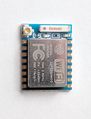 ESP8266-07 module
 -
 ESP8266-12E


ESP-01
ESP-01 modules expose only a couple GPIO pins. The ESP-01 package does not expose the EN pin which means you will not be able to put the chip in deep sleep and have it come back automatically.
ESP-07
These are about $2.00 USD each
ESP-12E
These are about $1.80 USD each.
ESP-12F
The difference between the ESP-12E and the ESP-12F is the on-board antenna.
Quick Usage
The ESP8266 runs on 3.3v and is not 5v tolerant. Use a voltage divider on the RX pin to step 5V to 3.3V. Applying more than 3.6V to any pin will damage the chip. Each pin can source a maximum of 12mA compared to 20-40mA for most Arduinos. There is one ADC but with a voltage range of 0.0-1.0V.
Wiring
To power on and play with the ESP8266, connect:
- Vcc to 3.3v
- GND to ground
- GPIO-15 to ground via 10k resistor
- GPIO-2 to Vcc via 10k resistor
- GPIO-0 to Vcc via 10k resistor (connect to ground directly to program)
- TXD0 to RX via Logic Level Shifter (TX on Arduino board without the Atmel chip)
- RXD0 to TX via Logic Level Shifter (RX on Arduino board without the Atmel chip)
- RST to Vcc via 10k resistor. (Connecting this to ground will reset chip)
- EN (or CH_PD on some boards?) to Vcc via 10k resistor
New out of the box, the stock firmware (ESP8266 NONOS SDK) will boot and begin accepting AT commands immediately over serial at 115200 baud. You will see garbage being dumped when the ESP8266 boots because the espressif boot ROM will write a boot log at 74880 baud (https://github.com/espressif/esptool/wiki/ESP8266-Boot-ROM-Log).
Arduino IDE
To write custom code for the ESP8266, start the Arduino IDE.
Add the ESP8266 boards:

- File -> Preferences -> Additional Boards Manager URLs, add: http://arduino.esp8266.com/stable/package_esp8266com_index.json
- Tools -> Board -> Board Manager -> Search for ESP8266 -> Install
- Select NodeMCU 1.0 (ESP 12-E Module)
To upload your code to the ESP8266:
- Power off the ESP8266
- Connect GPIO-0 to ground (disconnect from the 10k pull up)
- Power on the ESP8266
- Compile & Upload code in Arduino IDE
You may wish to change the upload speed from the default 115200 baud to speed up the upload process.
Boot Modes
When the ESP8266 boots, it will go into one of 3 boot modes depending on the GPIO pins:
| GPIO15 | GPIO0 | GPIO2 | Mode |
|---|---|---|---|
| 0V | 0V | 3.3V | Uart Bootloader |
| 0V | 3.3V | 3.3V | Boot sketch (SPI flash) |
| 3.3V | x | x | SDIO mode (not used for Arduino) |
- Uart Bootloader mode is used to upload code to flash
- Boot sketch (SPI flash) mode is used to boot from flash memory
Deep Sleep
When using ESP.deepSleep(30e6), GPIO 16 should be connected to the RST pin. The ESP8266 will wake itself up by sending a LOW to RST which will reset the device.
AT Command Reference
See:
- https://www.espressif.com/sites/default/files/documentation/4a-esp8266_at_instruction_set_en.pdf
- https://room-15.github.io/blog/2015/03/26/esp8266-at-command-reference/
AT+RST


OK

 ets Jan  8 2013,rst cause:2, boot mode:(3,7)

load 0x40100000, len 2408, room 16
tail 8
chksum 0xe5
load 0x3ffe8000, len 776, room 0
tail 8
chksum 0x84
load 0x3ffe8310, len 632, room 0
tail 8
chksum 0xd8
csum 0xd8

2nd boot version : 1.6
  SPI Speed      : 40MHz
  SPI Mode       : QIO
  SPI Flash Size & Map: 32Mbit(512KB+512KB)
jump to run user1 @ 1000

⸮⸮⸮
ready
AT+CWMODE=3


OK
AT+CWLAP

+CWLAP:(4,"SHAW-BDF273",-73,"44:e1:37:f5:ac:c1",1,31,0)
+CWLAP:(4,"SHAW-BDF273-Guest",-70,"46:e1:37:f5:ac:c2",1,33,0)
+CWLAP:(4,"TELUS5578",-82,"28:28:5d:11:32:f4",1,16,0)
+CWLAP:(3,"Linksys11303",-72,"58:ef:68:29:64:50",1,13,0)
+CWLAP:(4,"Jazzwalz",-78,"1c:ab:c0:af:f9:f8",1,28,0)
+CWLAP:(3,"dd-wrt",-64,"10:6f:3f:e7:df:70",1,6,0)
+CWLAP:(4,"SHAW-827C50",-86,"f0:f2:49:82:7c:58",1,23,0)
+CWLAP:(3,"HP-Print-9D-Officejet Pro 8610",-84,"94:57:a5:95:cc:9d",1,25,0)
+CWLAP:(3,"Hi Clayton!",-82,"a8:4e:3f:74:52:a8",1,18,0)
+CWLAP:(3,"tl746704-EXT",-73,"02:be:f5:00:95:15",1,15,0)
+CWLAP:(3,"CSISVAN2",-83,"b8:8d:12:63:0c:c3",1,23,0)
+CWLAP:(3,"tl746704",-71,"00:25:f0:74:67:04",1,32767,0)
+CWLAP:(4,"SHAW-FC70A1",-74,"78:96:84:fb:21:99",3,26,0)
+CWLAP:(3,"Winternet is Coming",-75,"88:1f:a1:2e:a7:8a",4,-24,0)
+CWLAP:(0,"HP-Print-AC-ENVY 4500 series",-79,"50:65:f3:ea:39:ac",4,30,0)
+CWLAP:(3,"MLJK",-72,"e4:f4:c6:19:ab:0c",4,21,0)
+CWLAP:(4,"SHAW-EB53F2",-65,"74:85:2a:70:b6:a8",6,8,0)
+CWLAP:(3,"RQNSQMDI",-74,"a0:63:91:68:43:f2",6,10,0)
+CWLAP:(4,"SHAW-70C250",-76,"a8:4e:3f:70:c2:58",6,21,0)
+CWLAP:(4,"SHAW-629C60",-79,"90:50:ca:62:9c:68",6,26,0)
+CWLAP:(4,"VBE",-81,"c4:12:f5:67:16:08",6,5,0)
+CWLAP:(4,"JAC521G",-84,"c0:7c:d1:ba:90:59",6,15,0)
+CWLAP:(3,"4i1WLTwF",-80,"08:02:8e:95:8e:1e",6,3,0)
+CWLAP:(3,"SHAW-65C6F0",-79,"a8:4e:3f:65:c6:f8",6,23,0)
+CWLAP:(4,"SHAW-2155A0",-83,"ac:20:2e:21:55:a8",6,16,0)
+CWLAP:(4,"JAC521",-81,"c0:7c:d1:ba:90:58",6,13,0)
+CWLAP:(4,"SHAW-44C170",-74,"00:fc:8d:44:c1:78",9,16,0)
+CWLAP:(1,"ralphgonzo",-77,"00:23:69:60:49:6d",9,-19,0)
+CWLAP:(4,"41B42D",-71,"70:54:d2:15:5d:d7",11,25,0)
+CWLAP:(3,"dd-wrt",-72,"a8:4e:3f:83:0d:78",11,28,0)
+CWLAP:(3,"tla73210",-72,"00:25:f0:75:65:08",11,32767,0)
+CWLAP:(4,"D7C9CC",-70,"7c:05:07:6f:a9:e3",11,15,0)
+CWLAP:(3,"HP-Print-9C-Officejet Pro 8620",-67,"6c:c2:17:1e:da:9c",11,15,0)
+CWLAP:(3,"Coopernet",-75,"b8:8d:12:63:d8:7b",11,11,0)
+CWLAP:(3,"Lannon's Guest Network",-76,"ba:8d:12:63:d8:7c",11,13,0)
+CWLAP:(4,"SHAW-E6B9C0",-76,"bc:4d:fb:e6:b9:c8",11,8,0)
+CWLAP:(3,"SHAW-6F6F30",-76,"a8:4e:3f:6f:6f:38",11,28,0)

OK
Flashing
To flash the stock firmware (NON-OS), get the SDK and the flashing tools from:
- http://espressif.com/en/support/download/other-tools
- http://espressif.com/en/support/download/sdks-demos
Source code can be found at:
Troubleshooting
Constantly Crashing
You absolutely need some decoupling capacitors because the initial power-on current draw might be enough to cause the microprocessor to crash. When this happens, you will see a stack printout over and over over the serial console similar to:
ets Jan  8 2013,rst cause:2, boot mode:(3,0)

load 0x4010f000, len 1384, room 16
tail 8
chksum 0x2d
csum 0x2d
v8b899c12
~ld

Soft WDT reset

>>>stack>>>

ctx: cont
sp: 3ffffc20 end: 3fffffc0 offset: 01b0
3ffffdd0:  00000000 4000420c 60000200 3ffef00c
3ffffde0:  00000100 40004ac0 00000100 003fe000
3ffffdf0:  00000100 3ffeefcc 3fffc718 003fe000
3ffffe00:  0000049c 00e8a101 40105584 0000049c
3ffffe10:  3ffeefcc 0000049c 003fe000 0000049c
3ffffe20:  3fffc718 3ffeefcc 000003fe 401001f0
3ffffe30:  003fe000 4022e2e6 000003fe 4023a800
3ffffe40:  3ffef46c 4022e39f 3ffeefcc 0000049c
3ffffe50:  000003fd 3fffff20 3ffeefcc 4022e382
3ffffe60:  ffffff01 55aa55aa 00000003 00000020
3ffffe70:  00000020 000000c2 000000c2 aa55aa55
3ffffe80:  000003ff 4022e86c 3ffeefcc 3ffeefcc
3ffffe90:  00000001 feefeffe feefeffe feefeffe
3ffffea0:  40105789 00000001 3ffeefdc 4022ea64
3ffffeb0:  3ffedf30 3ffeefcc 00000001 3fffff20
3ffffec0:  3fffff40 3ffef003 00000003 00000020
3ffffed0:  3ffef08c 3fffff81 00000001 4022eb36
3ffffee0:  3fffff20 4023a460 3fffdad0 3ffee348
3ffffef0:  3ffef3cc 3fffff40 3ffeefcc 4022eb05
3fffff00:  3ffeefcc 4022eb6c 3ffee2e0 00000000
3fffff10:  402013a8 feefeffe 3ffeefcc 4022e48a
3fffff20:  3ffee300 000000db 000000db 40203440
...
This issue seemed to have disappeared once I put a 100uF and 0.1uF capacitor on the power rails.
See Also
- https://en.wikipedia.org/wiki/ESP8266
- http://simba-os.readthedocs.io/en/latest/boards/esp12e.html
- https://homeautomationfordummies.wordpress.com/2016/03/04/esp8266-esp-12-getting-started/
- http://support.thingplus.net/en/esp8266.html
- https://tttapa.github.io/ESP8266/Chap03 - Software.html